Claude Code Turned My Brand Design into a Stunning 3D Website!

Can Claude Code build a fully interactive 3D product website without Blender, Spline, or any external 3D models?
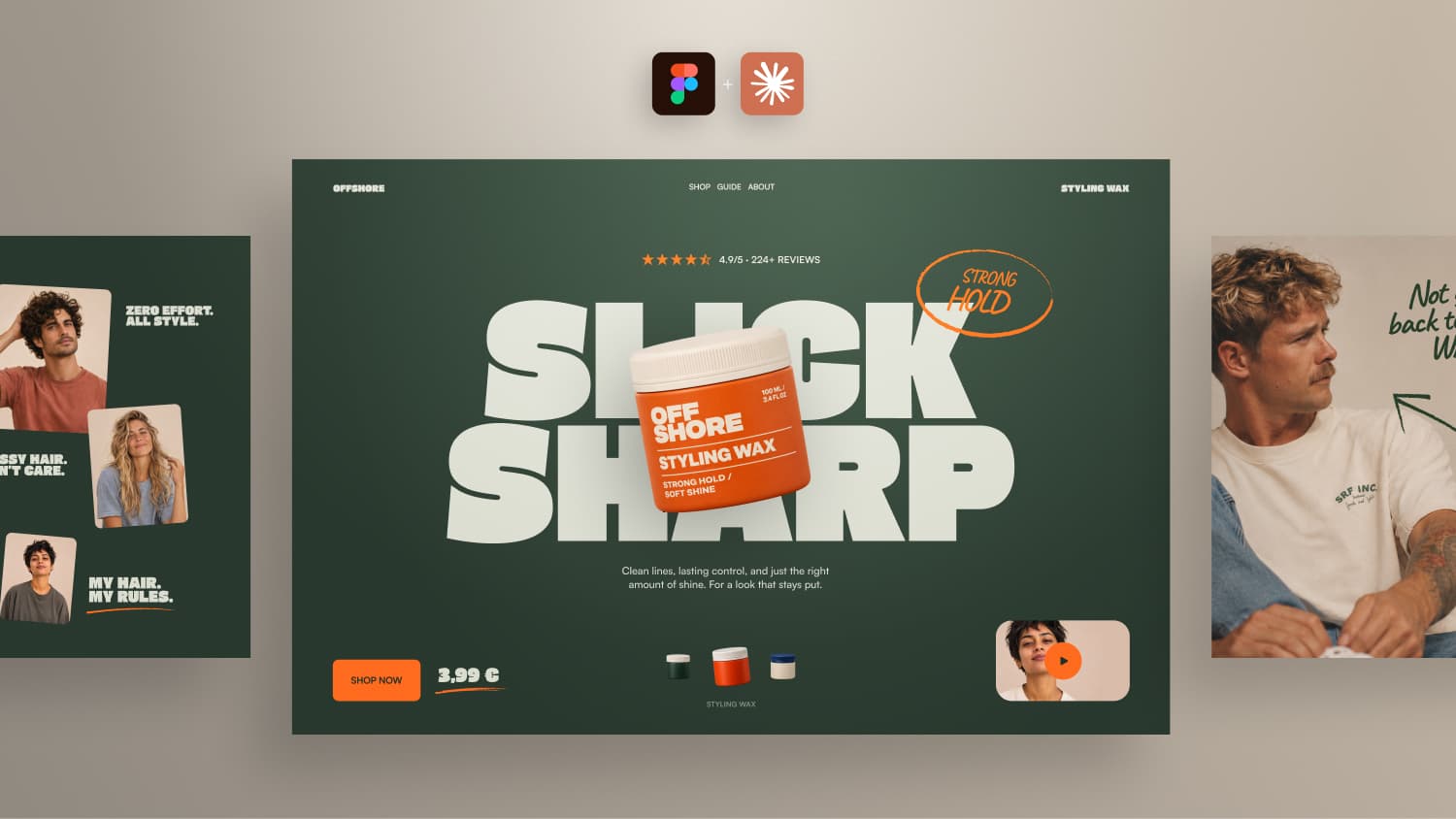
In this video, I designed OFFSHORE, a fictional hair styling brand, in Figma and used Claude Code to bring it to life with Three.js, GSAP, and the Figma MCP.
The goal was to create more than just a 3D product spinning on a website. I wanted a fully interactive product slider with rotating packaging, directional transitions, staggered typography animations, handwritten effects, and an animated video overlay.
I also show how I created the packaging artwork with AI, turned flat Figma designs into real 3D objects, and optimized the result for performance.
What you will learn:
- Building 3D product packaging entirely in code with Three.js
- Using Figma MCP with Claude Code
- Creating interactive product sliders and GSAP animations
- Working with AI-generated packaging and editable textures
- Creating product commercials with Hera AI
- Improving 3D performance and responsive behavior
Tools used:
Claude Code, Figma, Figma MCP, Three.js, GSAP, ChatGPT, Hera AI
Want to turn AI-built websites into real client projects?
I am currently developing a complete workflow.
Sign up: 👉 https://www.formburg.com/ai-web-design
Can Claude Code handle 3D on a real website?
3D elements make a website look impressive, but getting them to look good and perform well is hard, especially once animations come into play. In this experiment, Claude Code builds a complete 3D product website for OFFSHORE, a fictional hair styling brand with three products. The goal is a fully interactive product slider where the packaging rotates and moves across the screen, with all the small animation details that make a site feel polished. And all of it without any 3D software.
The design: big type and a floating 3D product
The concept is simple and effective: really big, bold typography in the center with a 3D product floating in front of it. This creates depth, and placing a product in front of oversized type almost always looks great.
Fonts
Three free fonts make up the type system:
- Gasoek One for the wide, heavy headlines
- Satoshi as a clean sans serif for longer text
- Caveat for handwritten notes, combined with circles, arrows and underlines
Usually one or two fonts are enough. But the handwritten scribbles add a personal touch and are a great playground for drawing animations.
Colors and grid
A pink version with dark type grabbed attention but didn't fit the direction. The final palette is a dark green background, warm cream text and a bright orange accent. The layout follows a 12 column grid with 80px margins and a 12px gutter. Pass these values to Claude in your prompt and put the font files directly into your project folder.
Thanks to the Figma MCP, Claude reads the design directly, including font sizes, spacing and positions. Most elements in Figma are positioned manually without Auto Layout, and that works surprisingly well.
Creating the packaging with AI
The packaging is a round plastic container with a screw lid. ChatGPT generated three packaging designs in different colors and added labels based on a screenshot of the Figma layout.
For a real 3D model, though, you need the label as one long flat strip with front and back next to each other, so it can wrap around the container. Claude took the PNGs from ChatGPT and recreated the labels directly in Figma via the Figma MCP. A nice reminder that AI helps not only with code, but also with small design tasks that would otherwise eat up your time.
Building the 3D model in Three.js
The 3D model is built entirely in code with Three.js. No Blender, no Spline, no external model. Before building the website, test the 3D part on its own in a simple test page. That way you can check the quality and make adjustments early.
The test prompt included:
- A round body using
LatheGeometrywith slightly rounded bottom edges - A separate lid with fine vertical grooves built into the geometry
- The label wrapped once around the body, with the front half facing the camera
- Soft studio lighting and a slightly glossy, physically based material
- Labels exported from Figma as compressed WebP textures
The performance is impressive: the entire hero section ended up at around 440 KB. A short MP4 of just one rotating product was more than twice that size. File size isn't everything, since rendering performance on mobile still matters. But it shows how quickly you can create a working 3D product concept for a client without modeling everything by hand.
The product slider and animations
Visitors switch between three products using a small navigation at the bottom. The animation direction depends on where the selected product sits relative to the active one: pick a product to the right, and it enters from the right.
While entering, the packaging rotates so the back of the label passes by. Then it settles in front of the headline and keeps floating slightly. The headline swaps letter by letter with a stagger: old letters leave upwards, new ones come in from below. A separate Figma artboard contains all text variations, so Claude knows exactly what changes.
For the handwritten notes, Claude built a small grid with different drawing effects and replay buttons. That is a fast way to compare animation options and pick your favorite. The section below the hero reuses these scribbles together with a second 3D product that visitors can rotate with the mouse.
A few prompt details that made a big difference:
- Keep all durations, easings and staggers in one config file
- Make every animation interruptible, even with fast repeated clicks
- Animate only with transforms to avoid layout shift
- Respect
prefers-reduced-motion
The video transition
Instead of opening a normal modal, the small autoplay teaser expands directly from its original position. While it grows, the hero content moves out to the left with slightly offset timing, the 3D product follows last and the background darkens so the video gets all the attention. Since there were no responsive designs in Figma, Claude decided the behavior for each breakpoint on its own first.
Reviewing the result
After three feedback prompts to fix an overlapping headline stagger, the result looks strong:
- The page load animation works, but some elements are visible too early and the notes appear before the headline
- The product slider and text transitions feel smooth
- DialKit lets you fine tune animation values directly in the browser
- The interactive 3D product returns smoothly to its pose and feels almost like a game
- The video transition looks natural thanks to the staggered timing
This is where prompting becomes really powerful. If you know how something should move and can describe it, Claude builds details in minutes that would take a long time by hand.
A few things still need work. The close button should animate independently from the video. A scroll fallback brings the stage back into view if you open the video further down the page, a detail you learn from real client projects. On smaller screens the video overlay gets cut off, so it needs to respond to the viewport height, not just the width. The spacing in the navigation, the size of the play button and some notes need small tweaks. Nothing major, just one more short feedback prompt.
Download the project
You can download the complete OFFSHORE project for free and explore it yourself. You'll find it in my templates.