
I Gave Claude Code My Hardest Animation Challenge Yet
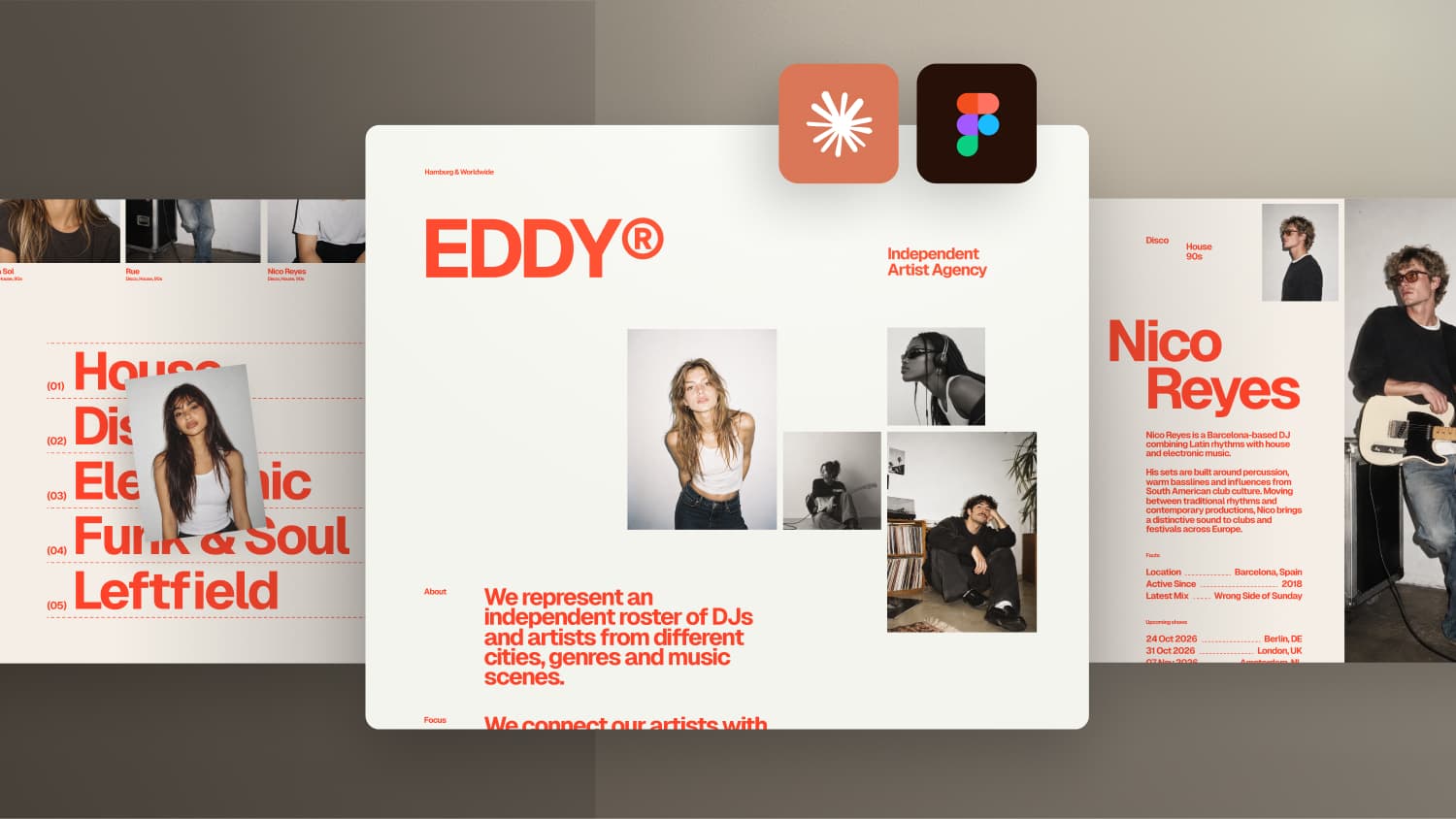

For this experiment, I designed EDDY, a fictional artist agency, in Figma and challenged Claude Code to build it using HTML, CSS, JavaScript, GSAP and Smooothy.
The goal was not just to recreate the design, but to make all the interactions work together smoothly. And the result surprised me.
🔗 Links & Resources
EDDY Template – Figma + Code Project: https://www.formburg.com/downloads
Smooothy Slider: https://smooothy.federic.ooo
Infinite slider meets animated overlay
The idea sounds simple: an infinite slider that moves on its own, can be dragged around and, when you click on an artist, expands the image from its current position into a full artist profile. Close the overlay and the image moves back into its slot in the slider before the autoplay continues.
In practice, this is one of the trickiest interactions you can build. I worked on something similar for a client project and remember how hard it was to get everything feeling smooth. So this time I wanted to find out how well Claude Code handles it, especially when it has to work with an existing JavaScript library and combine several complex interactions at once.
The design: EDDY, a fictional artist agency
To give the interaction some context, I designed EDDY in Figma, a fictional independent artist agency representing DJs and artists. The visual direction is inspired by 90s analog photography: slightly imperfect images combined with bold red type.
For the typography I used Geist, a free font I had wanted to try for a while. With a strongly reduced letter spacing (letter-spacing: -0.06em), the bold headlines get a much tighter, more editorial look.
The homepage is kept simple: lots of whitespace, a few images, some information about the agency and a small preloader where the logo animates in letter by letter before moving into its final position in the header.
I also explored a more complex overlay with a tab navigation for more artist details. It did not make it into this test, but it is part of the free download if you want to take the idea further or use the project as a starter template for a client project.
Why the slider transition is so tricky
Instead of building the slider from scratch, I used Smooothy, an open source JavaScript library that already comes with examples for infinite scrolling, snapping and parallax. Starting with something that already feels good and building on top of it makes a lot of sense for interactions like this.
The real challenge is the transition into the overlay:
- The slider has to stop at exactly the position where you clicked.
- The image moves from its card into the right half of the screen while the rest of the page animates out.
- The artist information appears and the image stays fixed on the right while you scroll through the content.
- Closing the overlay reverses the whole sequence.
Technically, this is a FLIP animation: you calculate the position and size of an element before and after the transition and animate between the two states. Because the slider is constantly moving, the start position has to be read in exactly the frame of the click. Otherwise you get visible jumps.
Generating consistent artist images with Higgsfield
For the overlay I needed two additional images per artist: a side profile and a portrait from the front. Both had to clearly show the same person as the main image. With nine artists, generating, downloading and renaming all of these manually would take a lot of time.
This is where Higgsfield comes in, the sponsor of this video. Higgsfield gives you access to many popular AI image and video models in one place, and with its MCP integration you can use them directly inside Claude Code. The setup takes only a few clicks:
- Log in at higgsfield and click on MCP in the navigation.
- Select Claude and click Connect.
- Continue the installation on the Claude connectors page and authorize access to your Higgsfield account.
After that, Claude can generate images right inside a chat. In my prompt I described how the images should look, where to save them and how to wire them into the overlay based on the artist slug.
A hover interaction for the genre list
At the bottom of the page there is a list of music genres with the artists grouped into categories. When you hover over a name, an image of the artist appears on the left, slightly rotated. The image follows the mouse and swaps with a masked slide effect when you move between names.
One important detail: the hover area is slightly larger than the visible text, so the image does not disappear immediately when you move away from a name. That avoids constant flickering.
How I prepared the project for Claude
The setup is the same as in my previous videos:
- Figma layouts exported as images, including a version with the 12 column grid visible, so Claude understands alignment and proportions.
- A CSV file with nine fictional artists including name, genres, bio, location and upcoming shows. Claude uses it to fill the slider, the genre section and all overlays automatically.
- The AI instruction markdown file from the Smooothy GitHub repository, placed directly in the project folder.
The stack is HTML, CSS and vanilla JavaScript with GSAP for the animations. I also added DialKit again to fine tune animation values directly in the browser. Since I only designed the desktop version, Claude had to figure out tablet and mobile on its own. A checklist at the end of the prompt asks Claude to compare the result with the Figma design.
The result
The build took about 48 minutes with Claude Opus 5.5 on high.
The preloader works exactly as planned: the logo animates in letter by letter and moves into the right position in the header. Only a short pause felt unnecessary. Compared with the Figma overlay, the layout is very close, with just one text block whose line height was slightly off.
The slider autoplays, slows down smoothly on hover and can be dragged. Two bugs showed up: after releasing the slider, the parallax images jumped back to their original position, and the slider did not extend to the left edge of the screen.
The part I was most curious about worked best. The image expands from the clicked card without any flickering or jumps, even when the artist is only partly visible at the edge of the screen.
In the genre section, the image transitions stay smooth even with fast mouse movements. I would still let the image disappear when you leave the list to the side and let it follow the vertical mouse position. Technically, Claude simply followed my Figma design here.
Code quality and mobile version
The code looks clean: proper button elements for the artists, semantic sections and accessibility for the overlays. The CSS uses variables for colors, typography and spacing, plus responsive values with clamp().
On mobile, the slider and the overlay transition work well. The image grid needs a consistent 12px gap, and I would make the artist name larger and place it right below the main image. Claude even made the artist names in the genre section clickable and solved the closing animation without a slider image to return to, without me asking for it.



-blog.jpg)