Webflow Pricing Explained Simply

Update: You can now find many answers to questions about Webflow pricing, hosting, GDPR and limitations below.
Webflow's pricing structure is actually simple—and yet it can be a bit confusing at first glance. When working with Webflow, it is not clear to many people which package they actually have to book in order to get the service they need. In this post, I'll explain to you how the Webflow prices built Are what the Distinguish between site plans and workspace plans Is and what you and your customers Webflow costs at the end of the day.
How much does Webflow cost? Site plans, workspace plans and free version
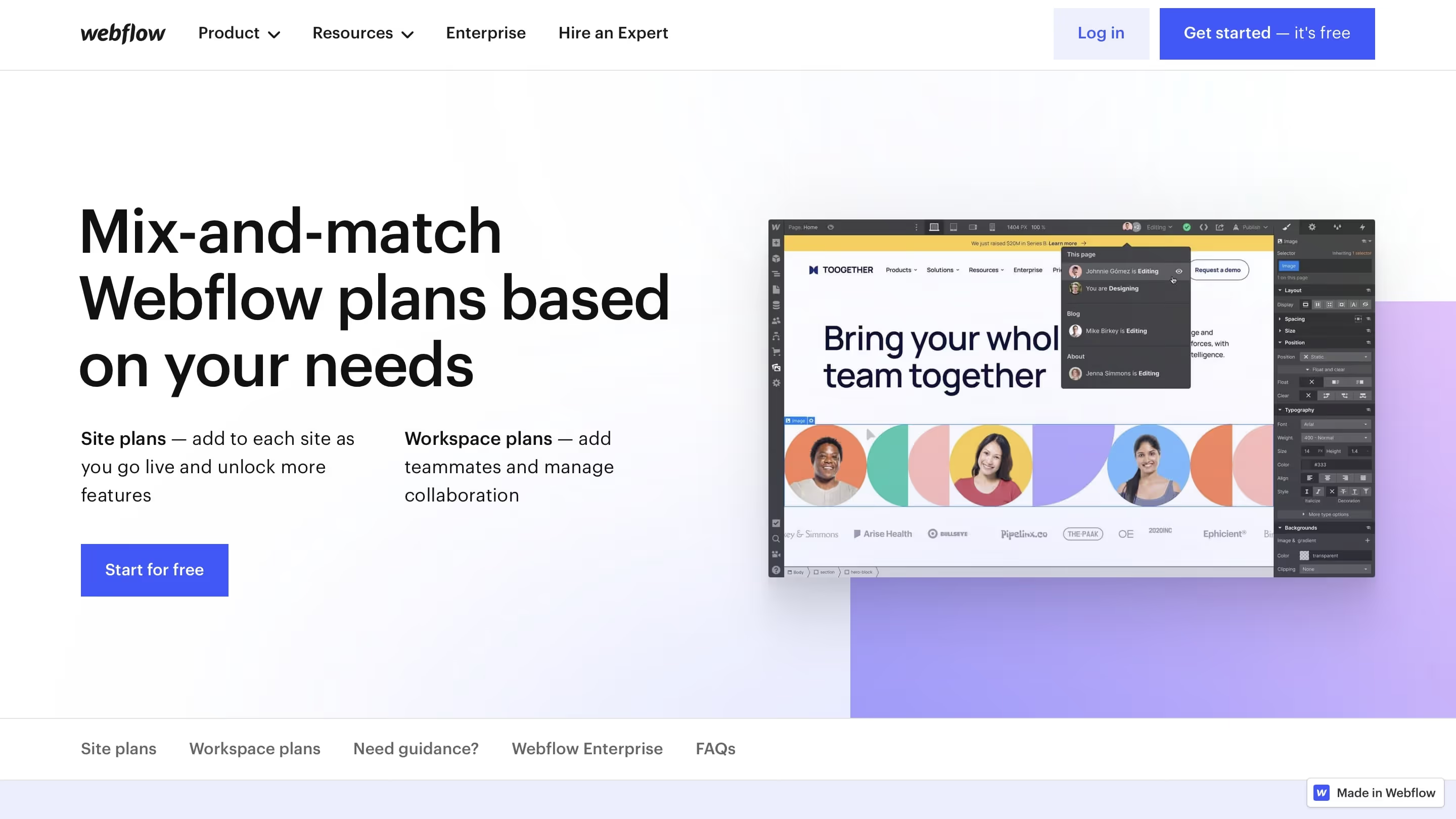
I have the feeling that the most complicated thing about Webflow pricing is the division into Site plans and Workspace plans is. You currently have on Webflow Plans & Pricing Choose between these two options — both of which also include a starter version. The difference between the plans quickly becomes apparent when you dive a bit into the topic.
Starter version: Anyone can start Webflow for free!
There is a free starter version in both Site plans and Workspace plans. It is an excellent choice for you if you just mean Webflow online course Complete and for now Test the tool Would like to. After clicking on the 'Start for free' button, this is almost unlimited. Because: Even in the trial version, Webflow already provides you with numerous features so that you get the best possible insight into the system.
With the free Webflow trial, you have the following options:
- You can create two projects
- You can use Webflow Designer
- You can create first sub-pages
- You can create a maximum of 20 Webflow CMS collections with a maximum of 50 items (e.g. 50 blog posts)
- You can publish your site under a free webflow.io domain
- You can use the Webflow CDN server and upload website assets such as images
What you can't do with the Webflow free trial:
- Exporting code
- Link the page to a custom domain
- Create more than 20 CMS collections
- Use some elements within the designer (e.g. the embed component, which allows you to integrate your own code)
Webflow Site plans: As soon as you implement real projects
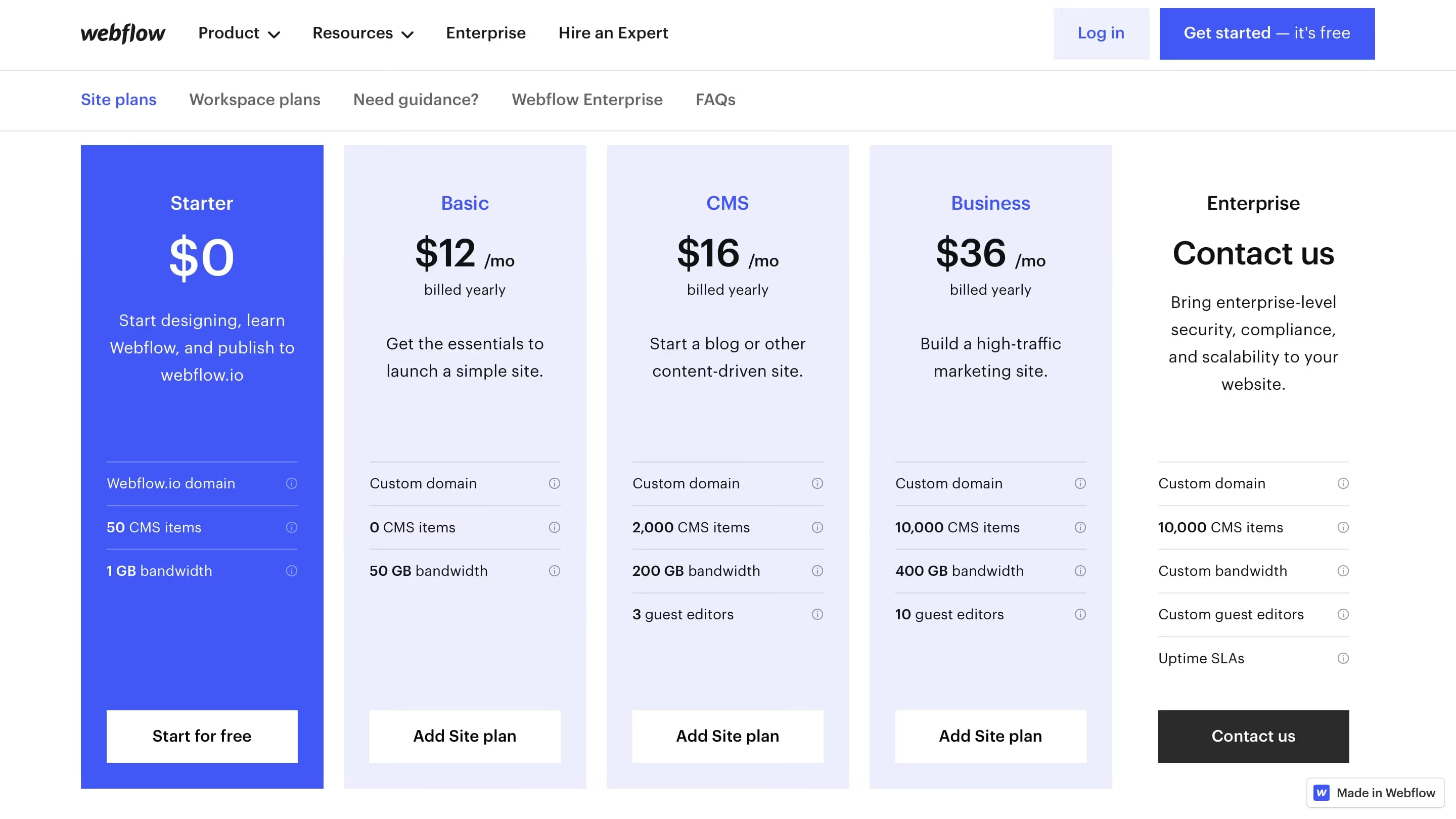
As soon as you work together with your customers - or simply a Project for a customer create - do you have to sign up for the appropriate Site map decide (Go to site plan overview page). As a simple rule of thumb, a site plan = a website project.
That means: In theory, you could also build a Webflow website with the free Webflow trial version (albeit only with limited functionality, of course). However, at the latest when you want to publish the website so that it can be reached via a domain, you need a site plan.
Tip: I first create a new account with Webflow for every new customer. So I can start building the site in free mode in peace and quiet - and then add the appropriate site plan later. That goes over
Project Settings → Hosting → Site Plans
How much does a Webflow website usually cost my customers
Here is the process:
- You create a free Webflow account for yourself (or on behalf of your customer)
- You create a new project in the dashboard
- You go to → Project Settings for this project
- You choose the point hosting out
- There you choose a package for the project (example CMS 16$)
That means this website will then cost approx. 160€ per year with all the trimmings. This includes hosting, linking your own domain and much more.
Which site plan you choose depends on the project you want to implement. The scope of the corresponding site plan can be found in Webflow Pricing
It is usually enough Basic Plan for non-dynamic pages off. The CMS Plan is the right choice if New articles or other new content are added dynamically should be. For example, if you want to include a blog on the website or add FAQs. I have summarized an overview of when the CMS makes sense for your project and when it doesn't in this article: The Webflow CMS: A comprehensive look at the features.
Webflow Workspace plan: When do I need it?
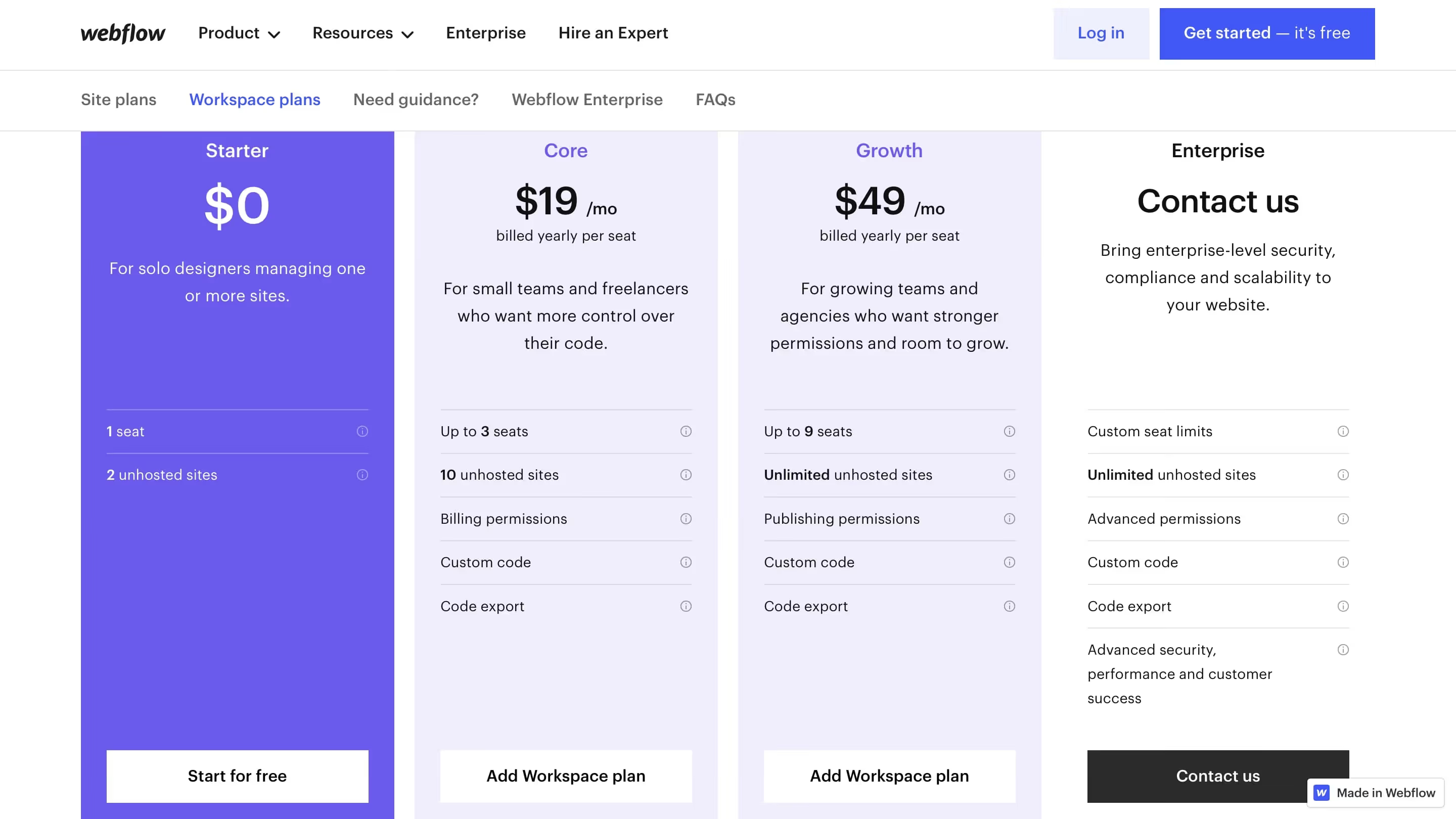
If you are a designer simply in the mood to train with Webflow, want to manage several projects with one account or work on Webflow projects together as a team, the Workspace plans are relevant for you (View workspace plan overview page).
The starter plan is the free Webflow version, which I already talked about earlier in this post. This is completely sufficient for practice. With this plan, you can two projects Create and create them alone edit. If that's not enough for you and you want to continue practicing with Webflow, simply use another email address to reactivate yourself for the starter plan.
Important: You are limited in the number of sub-pages in the free projects. Plus, you can only work on a project alone. However, for a One Pager that you create yourself, the starter plan is completely sufficient.
When do I need a Webflow Eommerce plan?
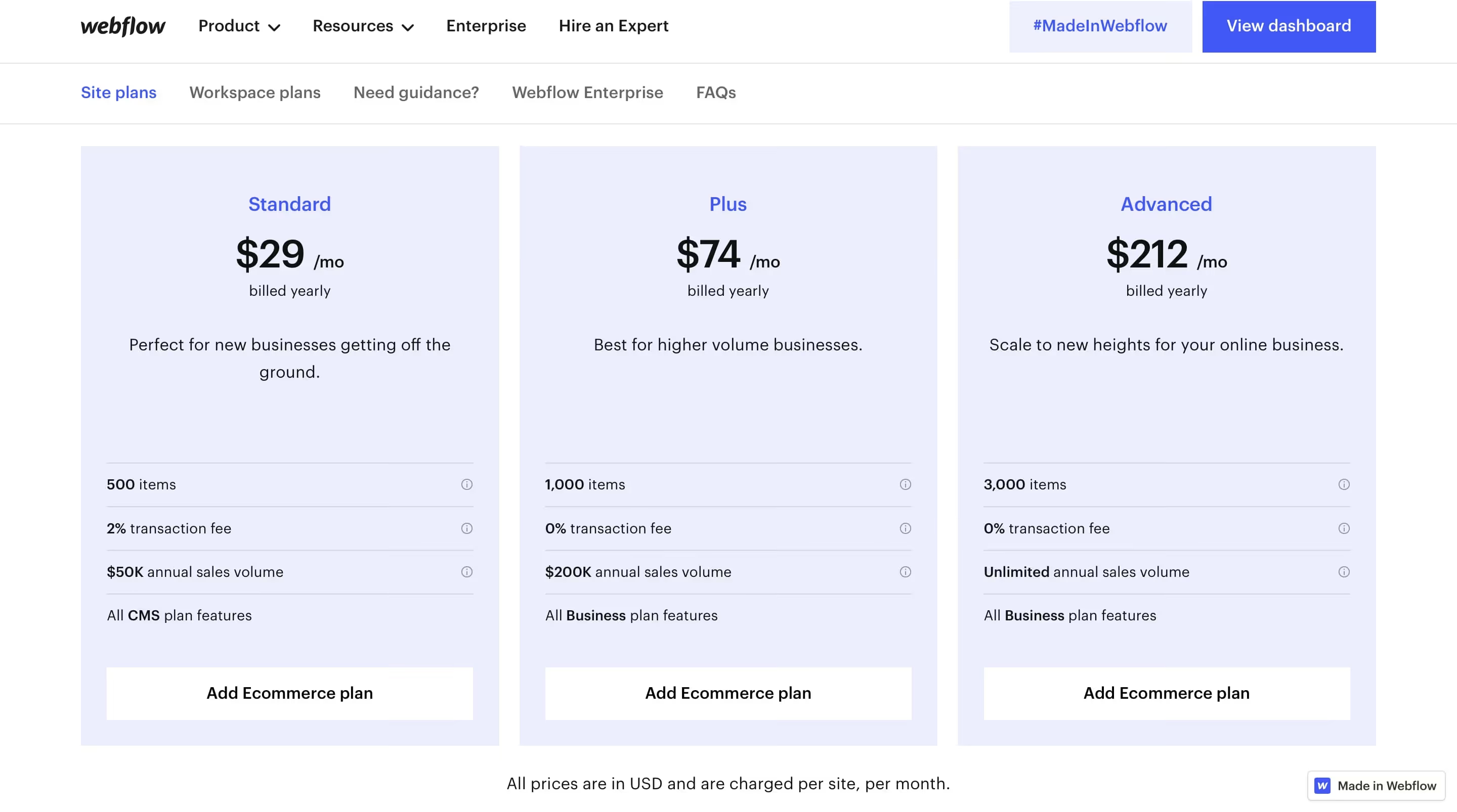
In addition to Site plans and Workspace plans, you have the option to choose an Ecommerce plan. You only need this package if you are building an online shop for yourself or your customers. Webflow explains which e-commerce plan you need in your project.
Summary: When do I need a site plan? When do I need a workspace plan?
Whenever you work for real customers, you need a site plan. This is the only way to make the website live later or link it to a domain. You have to buy this domain from another provider. Webflow doesn't sell domains itself.
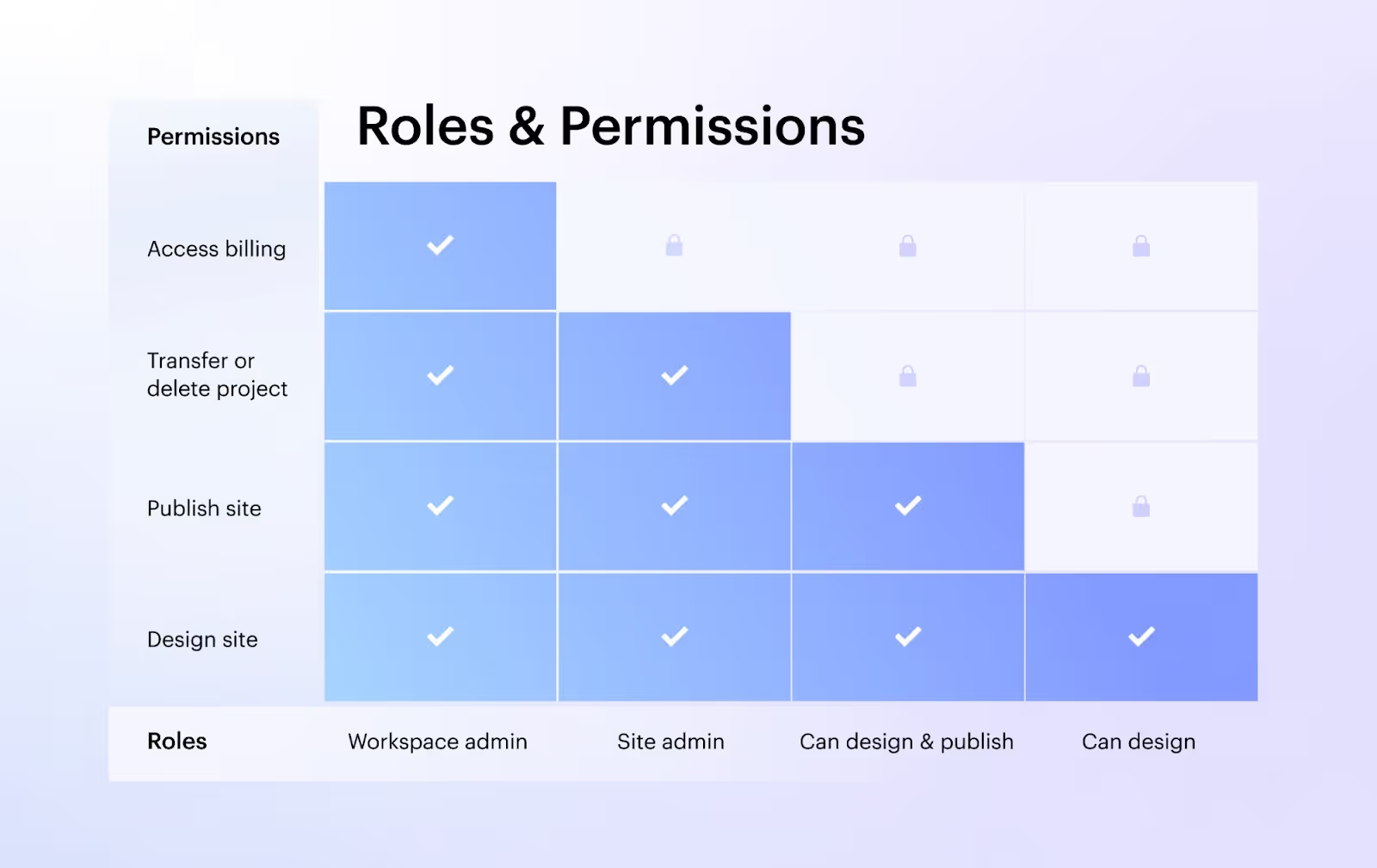
A workspace plan is interesting for you if you want to create more than two projects under one account. Or simply build a website with Webflow and then the Exporting code. The Workspace plan is also the right choice for teams working together on a website. The trick here: You can set your own permissions for each team member.
You can export the HMTL code of your pages to Webflow. But only if you opt for a paid Workspace Plan or Site Plan. This is not possible with the free starter plan. The option to export code is great if you build pages for your customers with Webflow, which will later be hosted on another server independently of Webflow. You can then forward the code to a developer who connects it to WordPress, for example.
Is Webflow worthwhile for freelancers? What do you get for the costs?
In my opinion, Webflow is always worthwhile for designers - who use the tool to create website projects for their customers. Because: The site plan is paid by the customer. Not because of you.
Overall, I rate the Webflow prices as fair. Even (and especially) when you compare with other hosting providers. How do you get with Webflow for the current conversion 12 US dollars monthly (payment is made annually) 50 GB bandwidth, 100 subpages and performance for 25,000 website visitors. This is completely sufficient for small and medium-sized projects. And it's all there — except a domain, which you have to buy from an external provider. Webflow's CDN servers are also among the fastest in the world.
By way of comparison: With DomainFactory, you pay 7.90 euros for 25 GB and 14.90 euros for 100 GB.
But the biggest advantage why it doesn't matter to many customers whether they pay a few euros more per month with Webflow is the easy editing of the page and the free updates. With Webflow, as a freelancer — and as a customer — you NEVER have to worry about a CMS or plugin update. You always have the latest version! As soon as Webflow releases something new or there is a security update, you have it immediately.
Post recommendation: Are Webflow websites safe?
It is always worthwhile - whether for Workspace plans or Site plans - to choose the annual payment method. This is significantly cheaper for you or your customers than the monthly payment.
Just familiarise yourself with Webflow prices and feel free to compare with other providers. You'll see that Webflow is doing comparatively cheaply.
If that doesn't convince your customers, show them how easy it is for them to visually edit content directly on their site. Without a complicated backend login. That is usually the moment when it clicks a lot. Because everyone in a company can use Webflow right away. Here is an example:
9 Answers about Webflow Pricing, Hosting, GDPR, and Limitations
What if the customer doesn't pay for their site plan? Is all data then completely gone?
No, the data is then not gone, but can no longer be reached. But I can't say exactly what happens after a long time. If a site hosted on Webflow isn't paid, it's no longer live at some point.
Can you export a page to Webflow with just a workspace plan?
You can export your entire site to Webflow, but without CMS content, logic flows, localizations, forms, page searches, e-commerce, and user accounts. You need a paid workspace plan for that. With the free starter plan, this is not possible.
Should the Webflow export feature be used to bypass Webflow's limited bandwidth?
“Does that make sense to some people? Perhaps for those who want to upload the data to their own hosting provider. In most cases, the bandwidth here is higher and at a lower price.”
answer:
The limited bandwidth plays a role for very few. It is for extreme users. And it would always be possible to add more bandwidth packages to Webflow. The effort of exporting Webflow and hosting it somewhere else just because of the bandwidth doesn't make sense in my opinion, because every time you make the slightest change, you have to export the page again and upload it somewhere else. It gets upset pretty quickly.
Do I still need a hosting package from another provider such as IONOS?
“If the customer absolutely wants a CMS, is this only possible via the CMS Site Plan with hosting in the USA (previously created in the Workspace Plan and transferred later, of course)? Do you then just have to order a domain name (if you don't have one yet) or should you still always take out a web hosting package, for example with IONOS?”
answer:
The Webflow CMS only works with a site plan. Hosting is already included and the customer ONLY needs a domain with a provider, NO hosting. The hosting is then not only in the USA. It is distributed all over the world. Here in Germany, for example, the website is loaded from an EU server.
Questions and answers about the Webflow plan
In your article, you recommend creating a separate account for each customer, the free one and building the website on it. Most websites require multiple sub-pages. If I see it correctly, the free version allows you to create two websites, each with two sub-pages. Is that correct?
Answer: Every project needs a site plan before it can connect to a domain and go online. I always use the CMS plan. After creating an account, you can add this plan to a new project and this frees up a number of sub-pages. Your customer then pays for the plan almost as soon as it is created, but there is no cost to you for it.
Export static page. To make things economical for him, I would have to create the website on my account and export the code from there. For me, this has the advantage that I have to hand over one of the 10 available websites. Only costs the customer the price of external hosting.
Answer: You can, but you'll lose a lot of useful features that my customers appreciate. For example, that they can edit their website themselves: How your customers edit their website with Webflow
Site plan “Basic”: Static site (without CMS): costs approx. 12 EUR/month (billed annually). The website is created on the customer's account and hosted by Webflow.
This saves your customer just 48€ a year compared to the CMS plan. And you can't use the CMS or the editor. And you have to export every time your customer just wants a text change.
Siteplan CMS: If you want to do everything with Webflow: Account, hosting and CMS system, the monthly costs (billed annually) are 16 Eur (additional effort is setting up the CMS first, then of course it's more convenient, but it's more expensive)
Once you've done that, you'll notice why it's so much easy to manage the pages directly with Webflow. The customer has no other costs except for a domain of around 12€/year.
If I now create a separate account for each customer, how is it possible to transfer components that have proven effective from one account to another.
I've found a solution to the issue How to copy elements back and forth between different Webflow accounts.

%2520unno%25CC%2588tig-blog.avif)